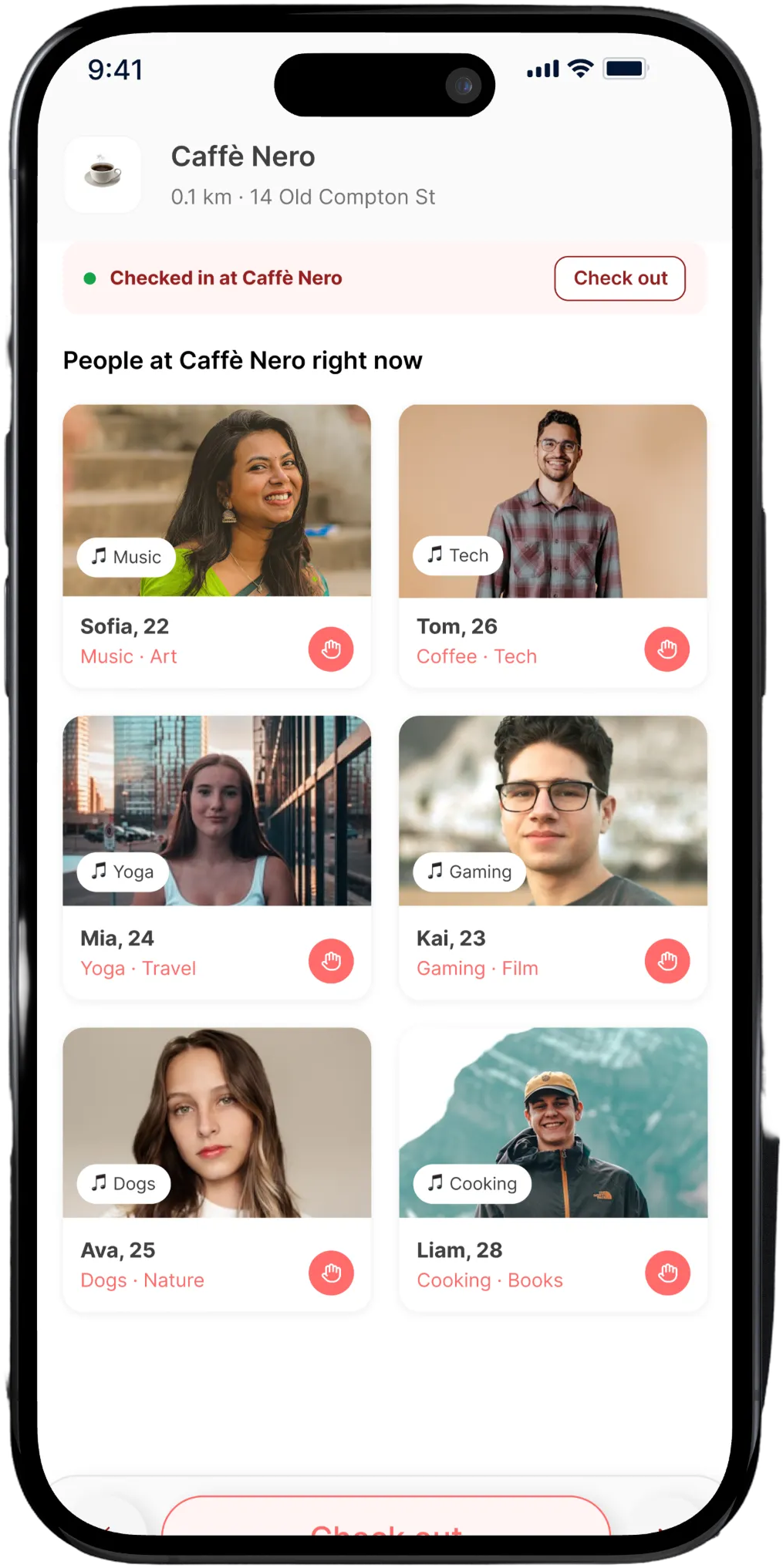
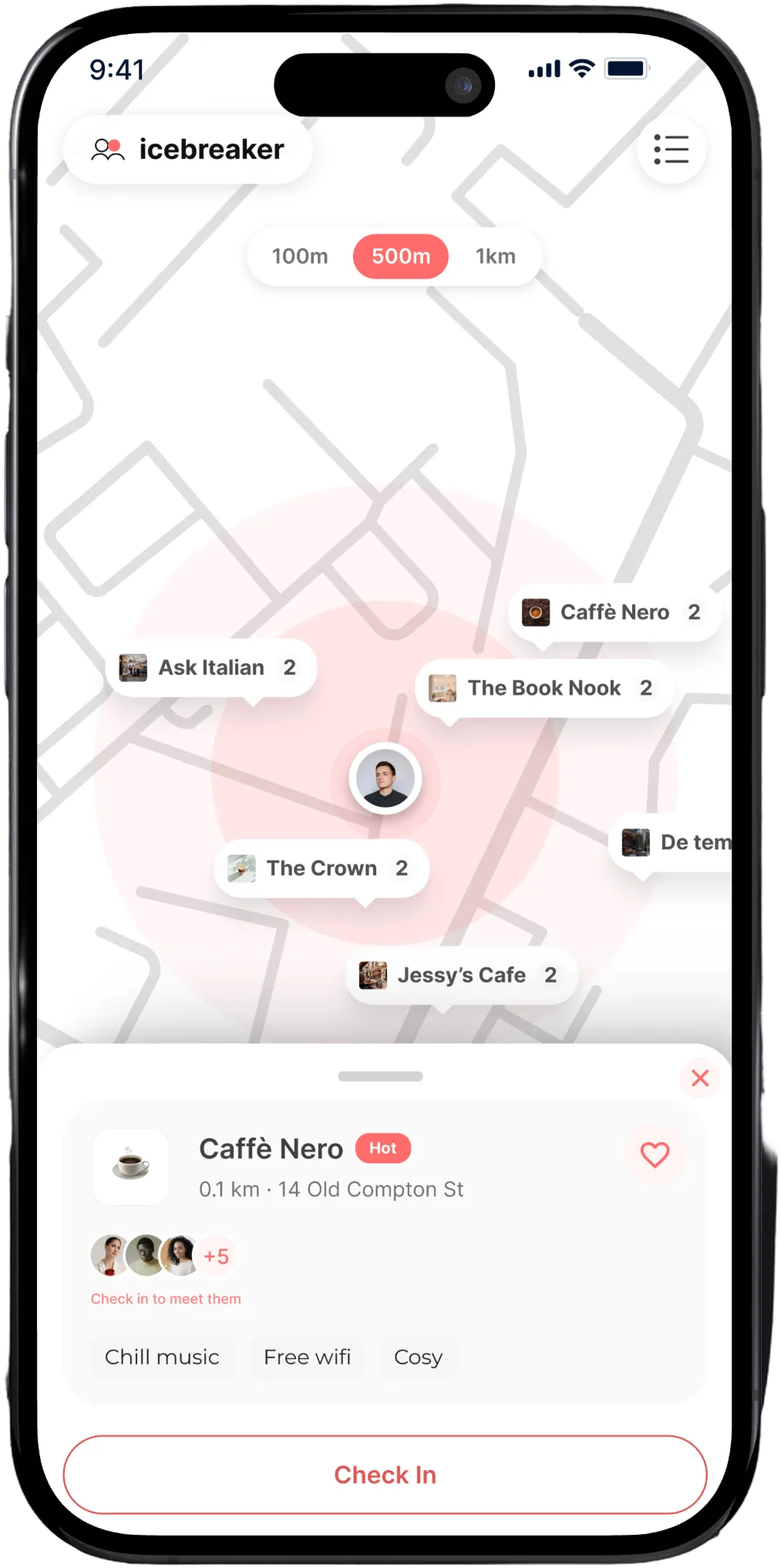
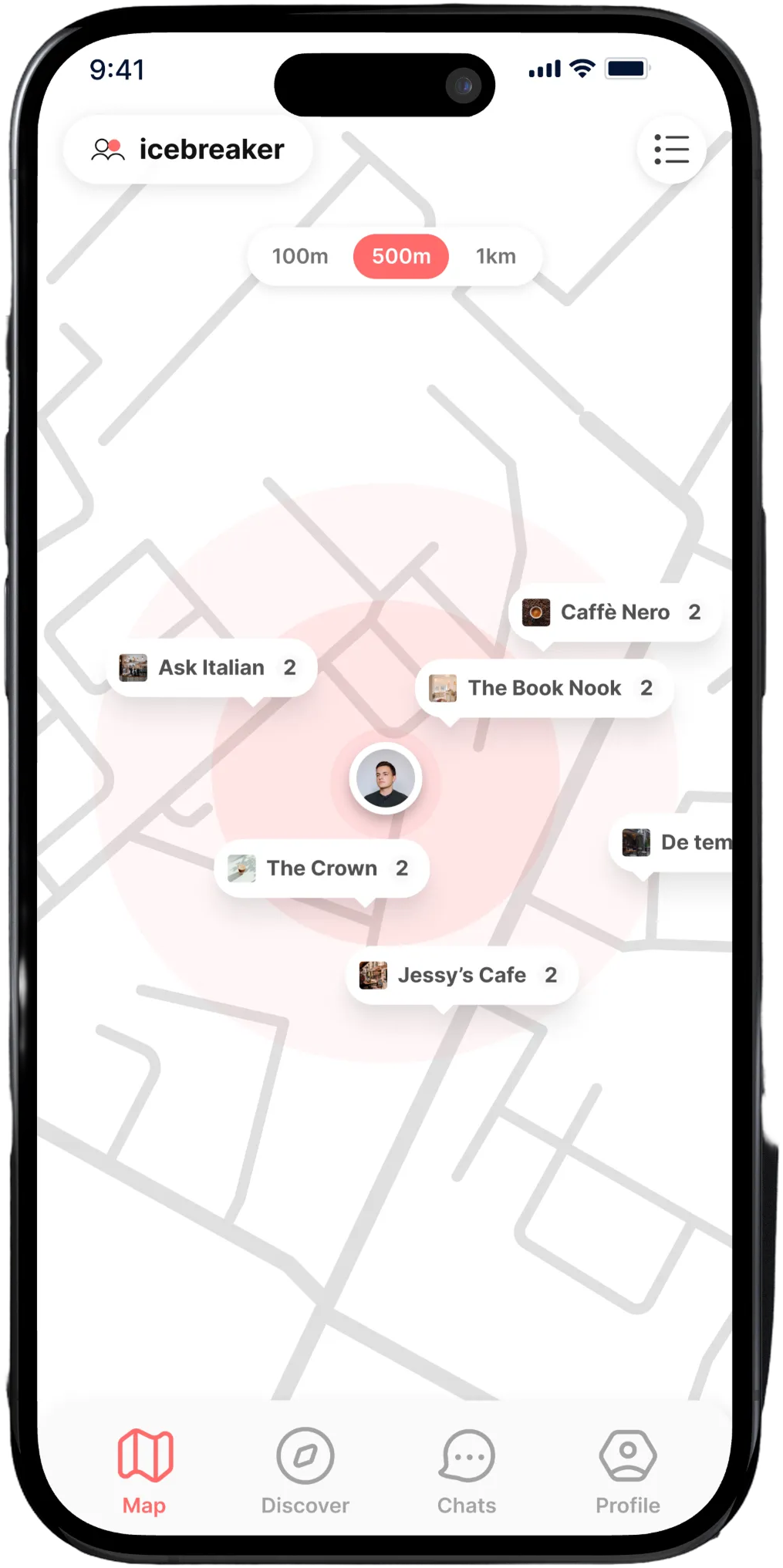
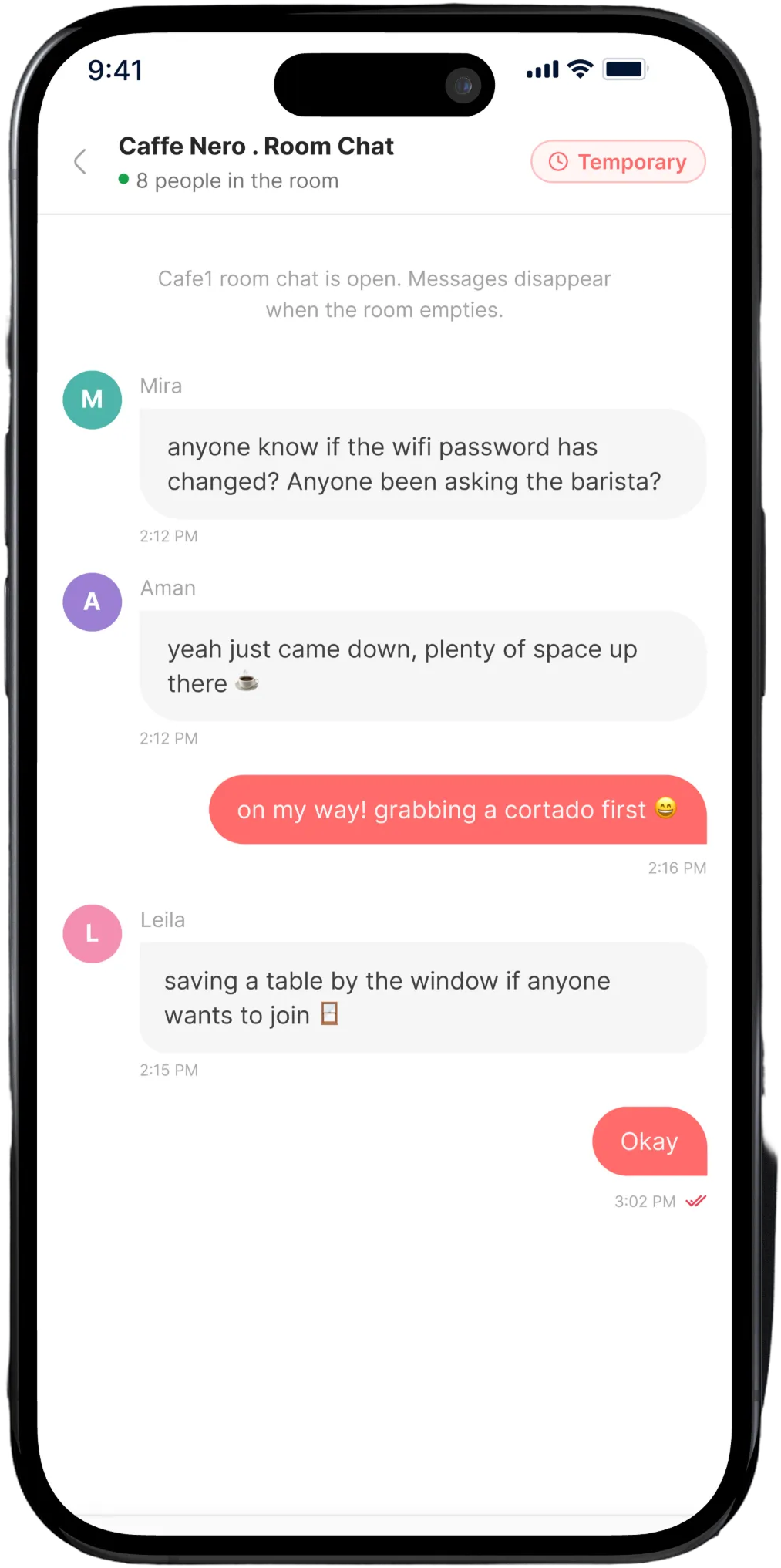
icebreaker shows who's checked in at the venue you're in right now. Join the room, offer a spare seat, send a wave. When you leave, your profile leaves with you.
Everything happens inside the room you're already in.
Six features, one idea: make the ten metres around you easier to talk to.
A live map of who's out right now
Pins show real venues with real headcounts, filtered to 100 m, 500 m or 1 km. Tap any pin to peek inside before you commit — who's there, how busy it is, how far you'd walk.
Check in and the room opens up
One tap from the venue sheet puts you in the room. Discover fills with the people actually sitting around you — shared interests surfaced first.
A room chat that closes behind you
Every venue gets a temporary group chat for the people currently inside. It reopens empty next session — no history, no archive, nothing to scroll back through.
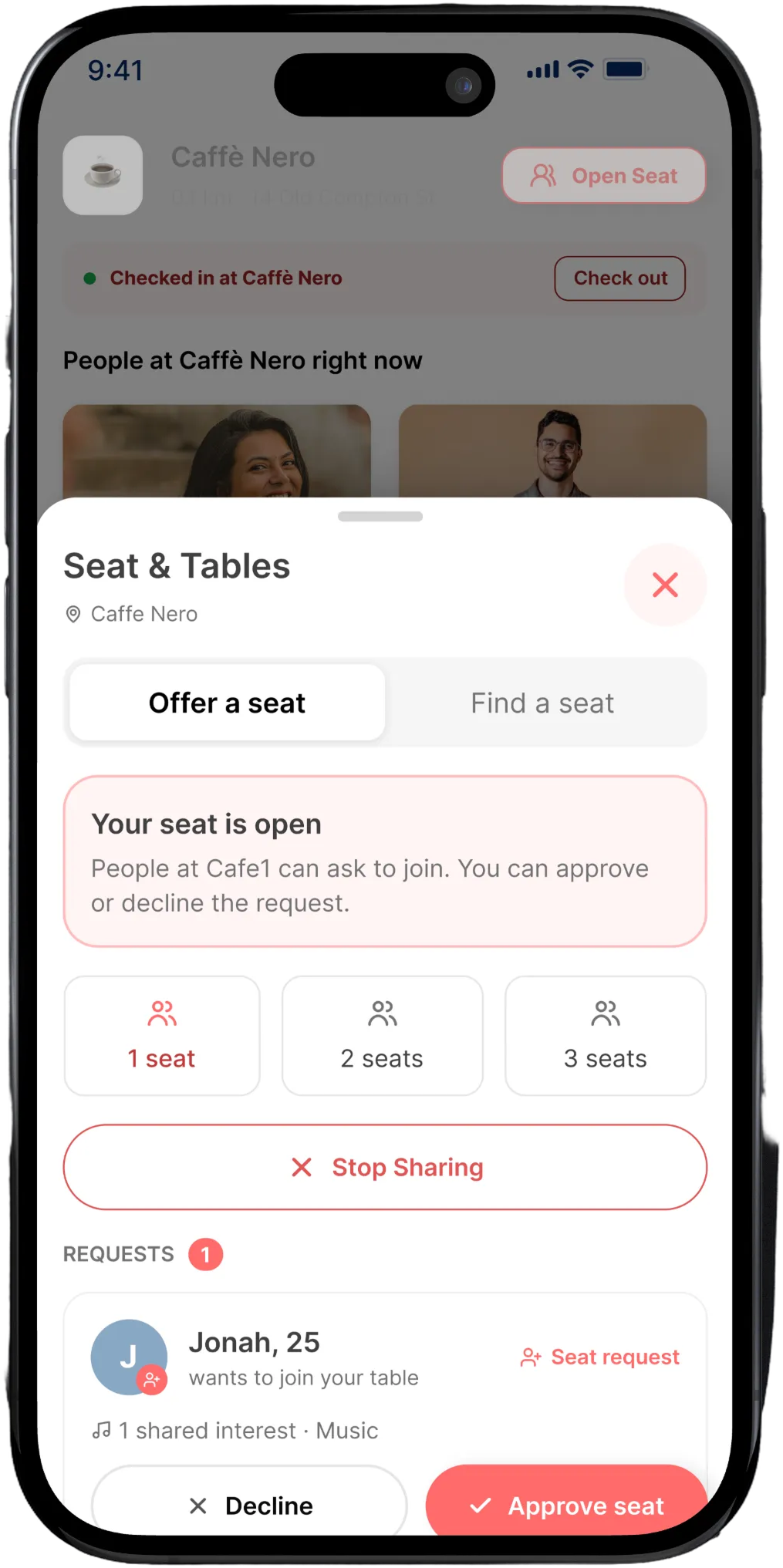
Open seats
Mark a chair or a whole table as free. Anyone in the room can ask to join, and you approve or decline each request yourself.
Waves, not cold opens
Send a wave instead of a message. If they wave back you're connected in Chats — nobody has to write the first line.
Venue vibes
On the way out, tag the place: relaxed, lively, work-friendly, quiet. The next person arriving sees what it's actually like.
How it works
Four taps from sitting alone to sitting together.
1
Open the map
See which cafés, bars and bakeries near you have people in them right now.
2
Check in
Tap a pin, peek at who's inside, then check in when you arrive.
3
Say something easy
Wave at a profile, message the room, or offer the seat across from you.
4
Check out
Leave, tag the vibe if you feel like it, and your profile disappears from the room.
Why icebreaker
Built for the room, not the algorithm.
Most social apps ask you to talk to strangers who could be anywhere, any time. icebreaker only ever shows you the people you could walk over to.
Presence over profiles
Nobody appears unless they're checked in nearby right now. No endless swiping through people three postcodes away.
Ephemeral by design
Room chats reset, profiles leave with you, venue vibes fade with the crowd. Nothing follows you home.
You hold the gate
Seat requests need your approval. Waves need reciprocation. Nothing opens a conversation without both people agreeing.
Only approximate distance
Your exact location is never shared with other users, and only people at the same venue can see you at all.
Your next conversation is two tables away.
Download icebreaker, check in to wherever you already are, and see who's around.
Point your camera here to automatically open in your device's App Store.
Account & data privacy
Account Management & Deletion
You maintain full control of your personal data. You can delete your icebreaker account inside the app at any time, or request deletion online if you no longer have access to your device.
Delete directly from the app
Open icebreaker and go to the Profile tab.
Tap Settings, then select Account.
Tap Delete Account and confirm your request.
The app immediately ends your active sessions, venue presence, and notification registrations. Profile details, photos, and direct identifiers are permanently removed or anonymized.
Request deletion without the app
If you have uninstalled the app or lost access to your device, you can submit an online deletion request.
This Privacy Policy explains how Icebreaker collects, uses, stores, shares, and protects information when you use the Icebreaker mobile application and related services.
Effective Date: July 24, 2026Last Updated: August 11, 2026Developer: Dafegen / NexsewaFor support, please contact: enquiry@dafegen.com
Summary for users: Icebreaker connects you with people checked in to the same venue as you, right now. We never share your precise GPS coordinates with other users. Profiles are only visible to eligible people checked in at the same venue. Room chats and presence records end when you leave. You can permanently delete your account and all associated data at any time.
1. About Icebreaker
Icebreaker is a venue-based social networking application developed by Dafegen / Nexsewa, based in Nepal.
Icebreaker helps users discover nearby venues, join a venue-based room, view eligible users at the same venue, send and receive waves, chat, and voluntarily arrange in-person meetings.
Icebreaker does not guarantee that another user is genuine, physically present at a venue, safe, or suitable to meet.
2. Minimum Age
You must be at least 18 years old to create an account or use Icebreaker's social, venue-presence, wave, profile, or messaging features.
People under 18 must not create or use an account. If we learn that an underage person has created an account, we may suspend the account and delete or anonymize the associated information.
Icebreaker may request reasonable information to confirm a user's age and may restrict interactions where necessary for user safety.
3. Information We Collect
3.1 Account information
We may collect:
Mobile phone number;
One-time password (OTP) verification information;
Internal account identifier;
Account creation date;
Login and authentication records; and
Account status.
3.2 Profile and onboarding information
We may collect information provided during onboarding or profile editing, including:
Name or display name;
Date of birth and age;
Profile photographs and uploaded images;
Gender, where voluntarily provided;
Interests;
Socializing preferences;
Preferred activities or venue categories;
Profile description; and
Other information voluntarily added to a profile.
Some profile information may be visible to other eligible users. Do not upload another person's image or personal information without permission.
3.3 Location and venue information
Icebreaker uses location information to provide its main features. We may collect:
Approximate location;
Precise device location when permission is granted;
Latitude and longitude;
Location accuracy;
Nearby venue searches;
Venues selected or joined;
Venue joining and checkout times;
Venue-presence status; and
Location-related security and technical records.
Location Privacy Guarantee: Other eligible users may see that you have joined the same venue. Icebreaker never shares your precise GPS coordinates with other users. When you manually check in to a venue, your Venue Presence is explicitly broadcasted and shared with other eligible users at that same venue.
Icebreaker requests foreground (while-in-use) location access. It does not request background location permission. Location permission is optional: you may decline it or disable it in device settings. If you decline location permission, the app will generate and display a random fallback location on the map and discover pages. This is used solely to provide a default view and does not reflect your actual physical location. A warning banner will be displayed whenever this random fallback location is in use. Features that require distance verification, including check-in, will be unavailable without location access.
Checking in is always a manual action. Before a check-in is created, Icebreaker displays a confirmation explaining that your profile and presence at the selected venue will become visible to eligible users there. Icebreaker does not automatically check you in based only on your device location.
3.4 Waves and interactions
We may collect:
Waves sent and received;
Wave acceptance, rejection, cancellation, or expiration;
Chat and connection status;
Blocking and reporting activity;
Venue-room interactions; and
Related timestamps.
3.5 Messages
We collect and store messages sent through Icebreaker, including:
Message content;
Sender and recipient identifiers;
Message timestamps;
Delivery and read status, where supported;
Reply relationships; and
Report or moderation status.
Messages are generally visible only to the sender and intended recipient. Authorized personnel may access relevant messages when reasonably necessary to investigate reports, prevent harm or abuse, provide support, enforce the Terms of Service, resolve technical issues, or comply with applicable law. Recipients may copy, screenshot, record, or redistribute messages. Icebreaker cannot fully prevent this.
3.6 Safety and report information
When a user reports or blocks another user, we collect reporting and reported account identifiers, report reasons, comments or evidence, related messages, venue and timestamp records, and action logs.
Icebreaker maintains a zero-tolerance policy for objectionable content and abusive users. Reports are prioritized and reviewed by our safety and moderation team.
3.7 Device and technical information
We may automatically collect device type, operating system version, app version, IP address, device/installation identifier, push token, language, time zone, crash reports, and diagnostic logs.
Guest Mode does not require an account. For guests, we process limited technical data such as IP address and request logs to return nearby venues without linking to a personal profile.
4. How We Use Information
We use your information to:
Create and authenticate accounts;
Verify age eligibility (18+);
Create and display profiles;
Show nearby venues and venue rooms;
Display eligible users at the same venue;
Process waves and connections;
Deliver messages and notifications;
Provide customer support;
Process blocks and reports;
Prevent fraud, fake accounts, spam, harassment, exploitation, and security threats;
Enforce our Terms of Service and community safety rules;
Maintain and improve app performance; and
Comply with applicable legal obligations.
We do not sell your personal information.
5. Permissions
Icebreaker may request permission for Location (foreground only), Camera, Photo library, and Push notifications.
Location: Used while the app is active for nearby venue results and manual check-in verification.
Camera & Photo Library: Used only when you choose to capture or upload profile photos.
Notifications: Used to deliver waves, direct messages, seat replies, safety notices, and updates.
You may decline optional permissions or withdraw them in device settings at any time.
6. Information Visible to Other Users
Depending on your check-in status, eligible users may see:
Display name and profile photographs;
Age or age range;
Interests, preferences, and profile bio;
Venue-presence status (only while checked in);
Wave or connection status; and
Messages sent directly to them or in venue group chat.
Your phone number, exact GPS coordinates, authentication records, and internal user IDs are never publicly displayed.
7. How We Share Information
7.1 Other users
Profile and presence data are shared only as needed to provide features you actively choose to use.
7.2 Service providers
We use trusted third-party providers for hosting, databases, storage, maps (Google Maps Platform), push notifications (Firebase Cloud Messaging), and OTP verification. Providers receive only the minimum data necessary and are legally bound to protect it.
7.3 Legal and safety reasons
We may preserve or disclose information when reasonably required to comply with law, protect individuals from serious harm, prevent child exploitation, or respond to fraud or security incidents.
8. Location Privacy
Joining a venue shows other checked-in users that you are at that venue. You must never use Icebreaker to stalk, track, or monitor anyone. We take active measures to:
Avoid publicly displaying exact coordinates;
Automatically expire venue presence upon departure or timeout;
Allow users to check out or leave a room at any time; and
Prevent unauthorized location access.
9. Data Retention
We retain information only as long as necessary to operate the service and fulfill safety and legal obligations:
Profile data is kept while your account is active.
Live venue presence is deleted upon checkout, room closure, or session expiry.
Temporary room chats are ephemeral and hold nothing after a session empties.
Reports and moderation logs may be retained for safety and legal compliance.
Protected backups rotate within 90 days.
10. Account Deletion
Users can permanently delete their account at any time directly in the app via Profile → Settings → Account → Delete Account.
Upon deletion, your account is permanently deactivated, direct identifiers and photos are removed or anonymized, and active sessions end immediately.
11. Your Choices and Rights
Subject to applicable law, you may request access to, correction of, or deletion of your personal data, withdraw optional permissions, or file a privacy inquiry with our team at enquiry@dafegen.com.
12. Security
We use industry-standard technical and organizational safeguards including encryption in transit, strict access controls, firewalls, and monitoring. Users are responsible for safeguarding their phone and verification codes.
13. User Safety
Online and in-person meetings involve risks. Always meet in public, inform a trusted friend, avoid sharing financial or private documents, and report any uncomfortable behavior. Icebreaker is not an emergency service — contact local authorities if you ever feel in danger.
14. International Processing
Our infrastructure and service providers may store and process data on servers located in and outside Nepal under appropriate data protection agreements.
15. Third-Party Services
Icebreaker integrates services such as Google Maps Platform and Firebase. These services operate under their respective privacy policies.
16. Changes to This Policy
We may revise this Privacy Policy from time to time. Material changes will be communicated through the app, website, or notification with an updated Last Updated date.
Plain language summary: By creating an account or using Icebreaker, you agree to these Terms and acknowledge the Privacy Policy. You must be 18 or older. We maintain a zero-tolerance policy for harassment, fake accounts, and abusive behavior. Reports and blocks are reviewed within 24 hours.
1. Eligibility
You must be at least 18 years old to create an account or use Icebreaker's social, venue-presence, wave, profile, or messaging features.
By creating an account, you confirm that:
The date of birth you provide is accurate;
You meet the minimum-age requirement;
You are legally permitted to use Icebreaker; and
You have not been permanently removed from Icebreaker for serious misconduct.
People under 18 are not permitted to create or use an account. Icebreaker may request reasonable age-verification information and may restrict, suspend, or remove accounts where age eligibility cannot be confirmed.
2. Your Account
You agree to:
Provide accurate and current information;
Use your own phone number and account;
Keep verification codes and device access secure;
Notify Nexsewa if you believe your account has been compromised;
Maintain only one personal account unless otherwise allowed; and
Take responsibility for activity conducted through your account.
You must not:
Create an account for another person without permission;
Impersonate another person;
Provide a false age or identity;
Sell, transfer, or share your account;
Access another person's account;
Create fake or automated accounts; or
Circumvent a suspension or ban.
3. Icebreaker Features
Icebreaker may allow users to:
Discover nearby venues on a map;
Join a venue-based room;
View eligible users associated with the same venue;
Send, receive, accept, or decline waves;
Start a chat and exchange messages;
Block or report another user;
Manage a profile; and
Voluntarily arrange an in-person meeting.
Icebreaker may offer a Guest Mode that allows users to access limited features, such as viewing maps and nearby venues, without creating an account. Guest Mode does not allow profiles, check-ins, waves, venue-member profiles, or messaging. Guests must accept and abide by these Terms and our community rules.
4. Venue and Location Rules
When you join a venue, eligible users may be able to see that your account is associated with that venue. Checking into a venue is always a manual action. Immediately before each new check-in, Icebreaker asks you to confirm that your profile and venue presence will be visible to eligible users at that venue. Icebreaker does not automatically check you in based only on background or device location.
Location permission is optional. You may decline it and continue exploring the map and venues using a randomly generated fallback location, but distance verification and check-in will be unavailable.
You agree to:
Join only venues where you are genuinely present or authorized to participate;
Not falsify or manipulate your location;
Leave or check out when you are no longer at the physical venue;
Respect venue rules, staff, and other visitors;
Not enter private or restricted areas;
Not use venue information to stalk or track another person; and
Not use Icebreaker to arrange unlawful activity.
Icebreaker does not own or control independent venues and does not guarantee venue entry, availability, safety, operating hours, or the conduct of other visitors. Joining a venue room does not create a reservation or right of entry.
5. Waves, Chats, and Meetings
A wave only expresses interest in communicating. Sending or accepting a wave does not create an obligation to respond, continue chatting, share contact details, or meet in person.
Consent to chat is not consent to meet. Consent to meet is not consent to physical, romantic, or sexual contact. Consent may be withdrawn at any time.
You must stop contacting or approaching another person immediately when they decline a wave, end a conversation, ask you to stop, block you, or leave the venue.
6. Personal Safety
You are responsible for deciding whether and how to communicate with or meet another user. Icebreaker does not guarantee a user's identity, background, physical presence, or intentions.
Safety Tips: Always meet in a public and populated venue. Inform a trusted friend or family member of your whereabouts. Keep control of your transportation. Never send money or share passwords, financial credentials, or sensitive documents.
Icebreaker is not an emergency service. In any emergency, call local authorities immediately.
7. Acceptable Use and Community Rules
You must use Icebreaker respectfully and lawfully. Icebreaker maintains a zero-tolerance policy for objectionable content and abusive users.
You must not use Icebreaker to:
Harass, threaten, stalk, intimidate, or bully another person;
Continue contacting someone after being asked to stop;
Promote violence, self-harm, hatred, or discrimination;
Exploit, groom, endanger, or sexualize a minor;
Send unsolicited sexual or highly offensive content;
Commit fraud, scams, deception, or identity theft;
Request money under false pretences;
Promote illegal drugs, weapons, or unlawful services;
Share another person's private photos or information without consent;
Send spam, mass advertising, or unsolicited promotions;
Upload malware, harmful links, or malicious code; or
Scrape, harvest, copy, or reverse engineer the service.
8. Special Rules Protecting Minors
Icebreaker is strictly an adults-only (18+) service and has zero tolerance for child sexual abuse material (CSAM) and child sexual abuse and exploitation (CSAE).
Suspected child exploitation will result in immediate account termination, evidence preservation, and referral to law enforcement and the National Center for Missing & Exploited Children (NCMEC). Review our full Child Safety Standards for reporting paths and contact details.
9. User Content
You retain ownership of the photos, text, and profile details you upload.
You grant Nexsewa a limited, non-exclusive, worldwide, royalty-free licence to host, process, display, resize, and moderate your content solely as needed to operate Icebreaker and enforce these Terms.
10. Messages and Communications
Messages are intended solely for conversation participants. You must not publicly disclose private messages for harassment or blackmail. Nexsewa may review relevant messages to investigate abuse, protect users, or comply with legal requirements.
11. Reporting, Blocking, and Moderation
Users can block or report any account from a profile or chat. Blocking takes effect immediately across discovery, waves, and chats and generates a safety signal for our moderation team.
Nexsewa targets review of user reports and safety signals within 24 hours of receipt. Confirmed violations may result in warnings, content removal, feature restrictions, or permanent account termination.
12. Privacy
Our collection and processing of personal data are governed by the Icebreaker Privacy Policy. You must not use other users' data for tracking or external solicitation.
13. Account Deletion
You can permanently delete your account directly in the app (Settings → Account → Delete Account) or online via our Account Deletion Request Page. Deletion permanently removes your profile, images, and session tokens.
14. Suspension and Termination
Nexsewa may suspend or terminate your account if you violate these Terms, pose a safety risk, provide false age or identity information, or engage in abusive conduct.
15. Third-Party Services
Icebreaker relies on third-party services such as Google Maps Platform, Firebase, and cloud hosting. Nexsewa is not responsible for independent third-party availability or terms.
16. Intellectual Property
Nexsewa and its licensors own all rights, title, and interest in the Icebreaker brand, software, designs, and code. You receive a revocable, personal licence to use the app in accordance with these Terms.
17. Service Availability
Icebreaker is provided on an “as is” and “as available” basis without warranties of uninterrupted uptime, absolute accuracy of maps, or real-time delivery of notifications.
18. Disclaimers
To the maximum extent permitted by law, Nexsewa disclaims all implied warranties, including merchantability, fitness for a particular purpose, and non-infringement.
19. Limitation of Liability
To the maximum extent permitted by applicable law, Nexsewa shall not be liable for indirect, incidental, special, or consequential damages resulting from third-party conduct, in-person meetings, or service downtime.
20. Changes to These Terms
We may revise these Terms as our features and legal requirements evolve. Continued use after revisions constitutes acceptance where permitted by law.
21. Governing Law and Disputes
These Terms are governed by the laws of Nepal. Any unresolved dispute shall be submitted to the competent courts of Nepal.
22. General Terms
If any provision of these Terms is deemed invalid or unenforceable, the remaining provisions remain in full effect.
Icebreaker is an adults-only service. People under 18 may not create or use an account. Regardless of that restriction, Icebreaker has zero tolerance for child sexual abuse and exploitation (CSAE) and child sexual abuse material (CSAM).
Icebreaker is strictly an adults-only platform intended solely for individuals aged 18 and older. Persons under the age of 18 are prohibited from creating an account, browsing profiles, or using any features of the platform.
Regardless of our strict 18+ age requirement, Icebreaker maintains an absolute zero-tolerance policy toward child sexual abuse and exploitation (CSAE) and child sexual abuse material (CSAM). Any attempt to exploit minors, solicit minors, or upload content depicting minors will result in immediate termination, permanent banning, and mandatory referral to competent law enforcement authorities.
2. Prohibited Conduct and Content
Users must not create, upload, send, request, distribute, link to, promote, or facilitate any of the following:
Child sexual abuse material (CSAM) or any visual or sexual depiction of a person under the age of 18;
Child grooming or any attempt to build trust or communicate with a minor for the purpose of sexual abuse or exploitation;
Sexualization of minors in profile bios, interests, venue wall notes, prompts, or messages;
Sextortion or threats involving a child’s real or alleged intimate content;
Child trafficking or commercial sexual exploitation of minors;
Requests or solicitations for sexual content or contact from a minor;
Instructions or resources that facilitate or promote child abuse, exploitation, or harm; or
Any conduct that endangers, exploits, or threatens the safety or well-being of a child.
3. In-App Reporting
Icebreaker provides easy, immediate, and accessible reporting tools throughout the application:
Profile Reporting: Open any user’s profile, tap the safety menu (⋯), select Report User, and choose Child Safety Concern.
Chat Reporting: Open any chat screen, tap the header safety menu, select Report, and specify child safety as the violation type.
Immediate Block: You may also block the user immediately. Blocking removes the user instantly across venue-member discovery, waves, and chats, and generates an expedited safety signal for our moderation queue.
4. Enforcement and Reporting to Authorities
Nexsewa reviews all child-safety reports immediately and no later than 24 hours after receipt.
When Icebreaker obtains actual knowledge of CSAM or confirmed CSAE, Nexsewa takes decisive action:
Immediate Removal: We permanently delete and disable access to the offending content across our servers and storage.
Account Termination: All associated accounts, phone numbers, and devices are permanently terminated and barred from accessing the platform.
Evidence Preservation: Relevant evidence, logs, and account data are securely preserved in compliance with applicable law.
Law Enforcement Notification: We report confirmed CSAM and CSAE to the National Center for Missing & Exploited Children (NCMEC)and to relevant regional law enforcement authorities where required by applicable law.
Icebreaker fully cooperates with valid legal requests and court orders, and reserves the right to take urgent protective action without prior notice.
5. Child Safety Point of Contact
Google Play, Apple, law enforcement agencies, child protection organizations, and users may reach Icebreaker’s designated child-safety officer directly at:
Designated Child Safety Contact:enquiry@dafegen.com Developer & Operator: Developed by Dafegen / Nexsewa. Jurisdiction: Nepal. This mailbox is actively monitored by authorized representatives empowered to review escalations, explain enforcement procedures, and coordinate emergency responses.
6. Emergency Assistance
If a child is in immediate danger or you suspect an active emergency, please contact local emergency services or law enforcement authorities immediately before submitting a platform report.
Icebreaker gives you full ownership of your personal data. Accounts can be permanently deleted directly inside the app, or requested online below if you no longer have access to your mobile device.
The fastest way to permanently delete your Icebreaker account is directly from your mobile application without needing to contact support:
Sign in to the Icebreaker account you want to delete.
Open your Profile tab.
Open Settings.
Tap Delete Account.
Read the deletion notice and tap Delete to confirm.
Instant Session Ending: The app ends your active session and any venue presence immediately after the server confirms deletion.
2. What deletion does
After a valid deletion request is fulfilled:
The account is disabled permanently and cannot be restored by signing in again;
The mobile phone number and direct profile identifiers are permanently removed or anonymized;
Profile details, uploaded media, and profile-photo objects are deleted or anonymized;
Active venue presence, push-notification device tokens, and current sessions are terminated; and
A later sign-in with the same phone number creates an entirely new account.
Data Retention Exceptions
Limited pseudonymous messages, user reports, block records, security logs, and related metadata may be retained where reasonably necessary for user safety, fraud and abuse prevention, dispute resolution, legal claims, or compliance with law.
Protected backups may retain deleted data until normal rotation, generally no longer than 90 days.
3. Request deletion without the app
If you have uninstalled the app or cannot access your phone, submit your details below. We will verify account ownership and process the deletion request.
Alternative Email Request
You can also email enquiry@dafegen.com with the subject Icebreaker account deletion request. Include the phone number (with country code) registered on the account.